Finding a digital calendar that keeps a busy kitchen running smoothly means prioritizing clarity, sync capabilities, and family-friendly planning tools. The options below highlight large touchscreens, strong calendar integrations, and engaging chore- and meal-planning features that can help you coordinate meals, activities, and reminders in one central place. Each product supports easy setup, real-time updates, and appealing display modes that suit a kitchen environment.
| Product | Brand | Key Benefit |
|---|---|---|
| LOOFII 10.1 Inch Smart Digital Calendar | LOOFII | HD display, cross-platform sync, chore chart |
| Skylight Calendar – 15″ Digital Calendar | Skylight | Large touchscreen hub, color-coded events, central planner |
| ApoloSign 21.5″ Digital Calendar | ApoloSign | Dual mode, AI-assisted controls, multi-calendar sync |
| moonka 10.1″ Smart Digital Calendar | moonka | Family planner with photo frame and app sharing |
| Skyzoo 15.6-Inch Digital Calendar | Skyzoo | Chore and meal planning, two-way calendar sync |
LOOFII 10.1 Inch Smart Digital Calendar

LOOFII’s 10.1-inch calendar combines a vivid HD touchscreen with flexible syncing. The device supports Google, iCloud, and Outlook via a free eCalendar app, making it easy to view and add events from multiple accounts. In idle mode, it can switch to a photo-frame display, letting you enjoy family memories while using the screen for planning. Its interactive chore chart and rewards system helps motivate kids with visible progress, which can reduce friction around daily tasks and routine changes in a kitchen-centered household.
Key considerations include the screen size, which balances visibility with countertop practicality, and the app ecosystem, which matters if your family already relies on Google or iCloud calendars. The LOOFII calendar suits households needing a compact, aesthetically flexible hub that supports both planning and light family entertainment without overwhelming counter space.
Skylight Calendar – 15″ Digital Calendar

The Skylight Calendar offers a generous 15.4-inch touchscreen designed to serve as a central family hub. Its suite includes color-coded event assignments and straightforward calendar syncing with Google, iCloud, Outlook, Cozi, and Yahoo. The device can be wall-mounted or placed on a stand, providing flexibility for kitchens, hallways, or home offices. With a focus on 2025-ready features, this calendar supports quick event entry and clear visibility, making it ideal for households that want a large, single-screen planning solution that others can glance at from the kitchen table.
Important considerations include display size versus counter clearance, mounting options, and how well the Skylight ecosystem integrates with existing calendars. If a large, shared board-style calendar is your priority, Skylight delivers a highly visible, collaborative planning experience with intuitive controls.
ApoloSign 21.5″ Digital Calendar

The ApoloSign 21.5″ calendar emphasizes a dual-mode experience: Calendar Mode keeps schedules synced across Google, Outlook, and iCloud, while Android Mode enables a dashboard-style smart family hub. The built-in rewards-based chore chart and color-coded To-Do lists help organize daily tasks such as groceries or shopping lists via the accompanying mobile app. Voice assistant compatibility and smart home integrations enable task reminders and weather checks using four built-in microphones, presenting a comprehensive kitchen-family management tool in one display.
When evaluating, consider whether you need a strong smart-home interface and whether the dual-mode platform aligns with your family’s device preferences. For households looking to merge routine planning with AI-assisted features and broad calendar compatibility, this model provides a robust solution.
ApoloSign 15.6-inch Digital Calendar

This 15.6-inch ApoloSign model also supports dual-mode operation with Google Play and multi-calendar sync. Its planner and family organizer centralize schedules, while the Android Mode offers a dashboard and smart family hub. A strong emphasis on chore charts and color-coded to-do lists helps families assign tasks and track progress. AI voice assistant features and smart-home controls enhance day-to-day management by allowing weather checks, alarms, and task management through voice, all integrated with Google Home for broader smart-home control.
Key decisions include whether you prefer the larger 15.6-inch display and the AI-enhanced voice features. If you want a calendar that doubles as a family command center with advanced control over routines, this is a capable option worth considering.
Moonka 10.1 Inch Smart Digital Calendar

The Moonka calendar centers on a 10.1-inch IPS touchscreen that supports a full WiFi-enabled family planner. Users can assign unique colors and tasks per member, supporting 2025 and beyond with ongoing synchronization across devices via a companion app. Its built-in digital picture frame capability makes it convenient for sharing moments while you manage schedules, meals, and activities. Easy setup includes connection to Wi-Fi and compatibility with Google Calendar, iCloud, Outlook, Cozi, and Yahoo, ensuring broad interoperability with your current tools.
Consider the balance between screen size and visibility in a kitchen environment. If you need a compact, all-in-one planner that also doubles as a photo frame, Moonka offers a practical, user-friendly solution for family coordination.
Digital Calendar, 10.1inch Smart WiFi Electronic Calendar

This 10.1-inch model emphasizes portable display with a 178° viewing angle and auto-brightness, delivering visibility indoors and outdoors. It offers quick setup—plug in and connect to Wi-Fi for automatic calendar syncing with Google, iCloud, and Outlook. The device supports three-way real-time sync across smartphones, tablets, and computers, ensuring that any schedule change updates across all devices. Its compact form makes it a practical bedside or kitchen center for families who favor cross-device coordination without large footprints.
When choosing, assess whether you need robust cross-device syncing and dependable auto-brightness for varied kitchen lighting. If fast setup and reliable multi-device synchronization are priorities, this model provides a straightforward, dependable option.
10.1 Inch Wall Planner Digital Calendar
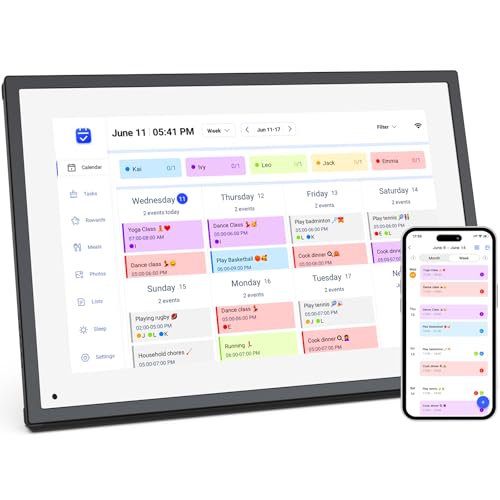
This 10.1-inch wall-friendly option combines a digital calendar, planner, and a digital picture frame in one unit. It excels for households that prefer a visual hub with color-coded chores and dedicated profiles for each family member. Notably, it does not support wall mounting, which is a consideration for kitchen space planning. The device supports meal planning, recipe access, and cooking tutorials via touch, plus smart home app integration for controlling compatible devices through the same screen.
For buyers who want an adaptable kitchen assistant that doubles as a media display and planning board, this model delivers a versatile feature set in a compact package, with emphasis on ease of use and centralized family coordination.
Buying Guide
- Screen size and placement: Larger screens improve readability from a distance, but require more counter or wall space. Consider room layout where the calendar will be used most.
- Calendar integrations: Look for compatibility with Google Calendar, iCloud, Outlook, Cozi, and Yahoo. Two-way syncing helps keep everyone aligned across devices.
- Chore and meal planning features: A robust chore chart, rewards system, and meal planning tools help translate planning into daily habits, particularly for families with kids.
- Smart home compatibility: Voice assistants and smart-home controls streamline routines. If you use Google Home or similar ecosystems, prioritize devices with AI or voice support.
- Display mode and media: Photo frames or video sharing can add value by letting families relive moments while planning menus and activities. Ensure the device supports easy app-based photo/video sharing.
- Setup and reliability: Quick setup, stable Wi-Fi integration, and responsive touchscreen input are essential for a kitchen environment where quick updates matter.
- Mounting options: Wall-mountable models save counter space; others offer stands. Decide based on your kitchen’s layout and wiring considerations.
- Price-to-feature balance: More features often mean a higher price. Prioritize the features that align with your family’s routine needs rather than chasing every possible capability.